Friday, January 3, 2014

Pentaho Data Integration : Microsoft Excel Input

Microsoft Excel Input step can be used to integrate data from various Excel sources including open office work books. This step can extract data from Excel 97-2003 ( xls ) files or Excel 2007 ( xlsx ) files.  Plz find stepwise illustration below on how to configure Pentaho Excel Input Step.
 

Step 1

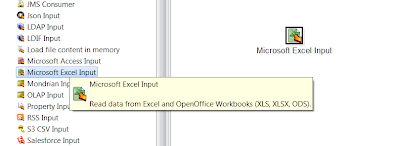
Drag and drop Microsoft Excel Input Step into the Transformation design canvas.
Wednesday, December 25, 2013

Pentaho Data Integration - Configure Oracle JDBC Connection

Stepwise illustration on how to configure native JDBC Oracle database connections for Pentaho Data Integration. JDBC connections are the easiest and most commonly used access protocol. Connections can be configured using Spoon and managed by DI server.

Step 1 :
 
Open Spoon.
Go to "Database Connection >> New Connection Wizard"

Pentaho Common Errors : Driver class 'oracle.jdbc.driver.OracleDriver' could not be found

Error Message

Error connecting to database [ORA_TEST_JDBC] : org.pentaho.di.core.exception.KettleDatabaseException:
Error occured while trying to connect to the database

Driver class 'oracle.jdbc.driver.OracleDriver' could not be found, make sure the 'Oracle' driver (jar file) is installed.
oracle.jdbc.driver.OracleDriver

Tuesday, December 24, 2013

Pentaho Business Analytics Enterprise Edition 5.0.2 - Installation for Windows 64 bit

 
Step 1 :
 Download latest Pentaho Business Analytics version ( 5.0.2 )  from http://pentaho.com/download
 
 
Step 2 :
 
Save and execute file pentaho-business-analytics-5.0.2-x64.exe.
Installation wizard will pop up. Click Next.

Sunday, November 10, 2013

Pentaho Data Integration - PDI 5.0.1 Installation for Linux

Step 1 : 

Download latest PDI version ( 5.0.1 )  from http://pentaho.com/download

Step 2 : 

Save the bin file to Downloads directory.
Execute bin file pdi-5.0.1-x64.bin.